Products
Tech Gifts Grandparents Will Actually Use (2026)
A practical 2026 guide to tech gifts for grandparents that get used after the holiday wrapping comes off — digital photo frames, simple tablets, easier video calls, and setup habits that matter more than the gadget itself. No invented prices.

As an Amazon Associate I earn from qualifying purchases.Some links on this page are affiliate links. If you buy through them, Mom's Magazine may earn a small commission at no extra cost to you. It never changes which products we recommend. How we recommend products.
The tech gifts grandparents actually use are the ones that solve one clear job with almost no weekly maintenance: seeing family photos without opening an app, making a video call without hunting for a password, reading or watching something without five competing icons. Prioritize large readable text, a single primary button or home screen, automatic updates you can leave alone, and a setup session you finish before the gift is opened. Skip anything that needs a separate subscription you have not already paid for, a monthly "just check this setting" chore, or a learning curve that only makes sense if they already love gadgets. Match the gift to how they already talk to family — not to what looks impressive in a box.
Quick picks
| Product | Best for | |
|---|---|---|
| Aura Carver 10-Inch Digital Picture Frame Our top pick | A digital photo frame when the job is seeing family photos | Check price on Amazon |
| Skylight 10-Inch Digital Picture Frame Photo frame | A 10-inch Wi-Fi frame whose title says no subscription is needed | Check price on Amazon |
| Amazon Echo Show 8 Voice and video | A larger smart display for voice and video, after you do the setup | Check price on Amazon |
| Amazon Echo Show 5 Voice and video | A smaller smart display when counter space is tight | Check price on Amazon |
| Kindle Paperwhite 16GB (2024) Reading | Reading on a glare-free screen instead of a full tablet | Check price on Amazon |
| Fire TV Stick 4K Select Streaming | Streaming on a TV they already have | Check price on Amazon |
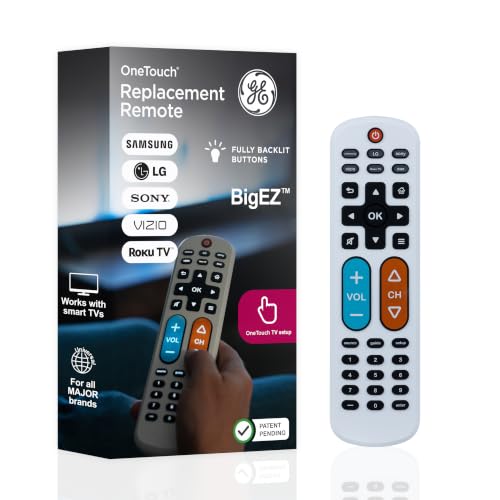
| GE BigEZ OneTouch Big Button Universal Remote Easy remote | A big-button remote when the small clicker is the problem | Check price on Amazon |
Every December, well-meaning adult kids buy grandparents a sleek new gadget, wrap it carefully, and then spend the next six months fielding the same texts: the screen went black, the password changed itself, the photos never showed up, or the tablet is still in the box under the spare towels. The problem is rarely that older adults cannot learn technology. It is that most gift tech is designed for people who already live inside app ecosystems — and grandparents often want one reliable outcome, not a platform.
This guide is about choosing and setting up tech gifts that survive January. It is editorial guidance, not a lab test: we do not invent hands-on rankings, dollar amounts, or "we tried twelve frames" claims. Where Amazon links appear, they are search or product links with our standard Associates tag so you can compare current options yourself. If you also want non-gadget keepsakes built from family photos, our personalized photo gift ideas covers books, prints, and puzzles that still land when a screen feels like too much.
No prices on this page
Retail prices move constantly. We do not quote dollar figures. Use the filters below, then check live listings for what is in stock and what each device actually requires (Wi-Fi, accounts, subscriptions).
What makes a tech gift get used after the holidays
Used gifts share a few boring traits. They replace a friction they already feel (missing the grandkids' faces, squinting at a phone, missing a call because the app moved). They do not require a weekly administrator. And someone who loves them has already completed the hardest twenty minutes — Wi-Fi, accounts, permissions — before the ribbon comes off.
- One primary job. Seeing photos. Making a call. Reading large-print books. Hearing podcasts or audiobooks clearly. Pick one.
- Visible, large interface. High contrast, big type, few home-screen icons. If you need a tutorial video to find the camera, keep shopping.
- Automatic content or one-tap actions. Photos that arrive from family phones without them uploading anything. A call button that always dials the same people.
- Physical durability and simple power. A cord they can find, a stand that does not tip, a battery that lasts a normal afternoon.
- Your ongoing support plan. Who resets Wi-Fi? Who adds the next grandchild's phone to the frame? Write that down.
Gift the outcome, not the category
"I want them to see the kids every week" points to a photo frame or a dedicated video-call device. "I want them to have an iPad" is a category. Start from the outcome.
Digital photo frames: the highest hit-rate tech gift
Digital frames work when family members can send photos from their own phones and the frame shows them without the grandparent managing an album app. That "set and forget" loop is why frames outperform generic tablets for many families — the tablet can do photos, but it also invites every other distraction and login problem.
Before you buy, check four practical details on the product page: whether it needs its own Wi-Fi account, how many people can contribute photos, whether storage is local or cloud-based, and whether the frame sleeps on a schedule so it is not glowing at 2 a.m. Avoid frames that only accept photos from a USB stick you have to update in person unless that is genuinely how your family shares pictures.
For a deeper, senior-focused comparison of which frames are easiest to live with day to day, see Senior Tech Review's rundown of the easiest digital photo frames for seniors. In partnership with Senior Tech Review — their guide is written for older adults and the people setting devices up with them, which is the exact job this gift has to pass.
When you are ready to browse current options, start with a tagged Amazon search for frames that match your size and Wi-Fi needs rather than guessing from memory of last year's model names.
Browse digital photo frames on AmazonAffiliate search link. Compare current specs, contributor apps, and reviews yourself — we do not invent rankings here.
- Pre-load twenty photos before gifting so day one is not a blank screen.
- Add every sibling who regularly takes kid photos as a contributor.
- Put the frame where they already sit — kitchen counter or favorite chair sightline — not in a formal room nobody uses.
- Write the contributor app name and who to text if photos stop arriving on a card taped to the stand.
Simple tablets — only if you will configure them first
A tablet can be a wonderful grandparent gift when it becomes a big, bright window for video calls, email, recipes, or library books. It becomes a paperweight when it arrives with a default home screen full of apps they will never open and notifications that feel like alarms.
If you go this route, budget more time for setup than for shopping. Create or confirm their Apple or Google account, connect Wi-Fi, enlarge system text, turn on the easiest video-call app your family already uses, remove icons you know they will not need, and leave a one-page cheat sheet with three tasks only: open FaceTime/Meet/WhatsApp, answer a call, and make the text bigger. Our comparison of Fire kids tablets vs iPad for kids is written for child profiles and parental controls — grandparents need the opposite priority (fewer controls, larger defaults), but the same lesson applies: the software setup decides whether the hardware gets used.
| Situation | Lean toward | Why |
|---|---|---|
| They already have an iPhone | iPad (same Apple ID habits) | Fewer new account concepts |
| They only need video calls + photos | Dedicated call device or photo frame first | Less surface area for confusion |
| They read a lot and dislike glare | E-reader with large fonts / adjustable light | One job, long battery, calm interface |
| Budget is tight and family will support Android | Simple Android tablet you pre-configure | Works if you own the setup |
Browse large-screen tablets on AmazonAffiliate search link. Verify current storage, cellular vs Wi-Fi, and accessibility features on the listing.
Do not gift a tablet still in shrink-wrap
An unopened tablet shifts the entire setup burden onto the recipient on a holiday morning. Open it, charge it, sign in, enlarge text, place the call apps on the dock, and test a real call with them before you wrap it — or schedule a setup visit as part of the gift.
Video calling that does not need an app scavenger hunt
Missed calls between grandparents and grandkids are rarely about love. They are about notifications buried under other apps, cameras pointed at the ceiling, microphones muted by accident, and relatives who each use a different app. The gift that fixes this is often not "a better phone" — it is a stable place to take calls (a tablet on a stand, a dedicated call device, or even a laptop that already works) plus family agreement on one app.
- Pick one family app and put it on everyone's home screen — not three options "just in case."
- Mount or stand the camera at face height so they are not holding a device for the whole call.
- Save favorites as one-tap contacts with the kids' faces as contact photos.
- Practice once on a calm weekday, not during a birthday party when everyone is already late.
- Decide who gets the "it logged me out" text — usually you — and put that number on a sticky note.
If hearing is part of the struggle, prioritize devices and headsets with clear volume controls and, when relevant, hearing-aid compatibility notes on the manufacturer page. That is product research, not medical advice — for hearing concerns, they should talk with their clinician. Your job as gift-giver is to avoid tiny, fiddly earbuds they will lose and to test volume before the holiday.
Voice helpers and audio — useful when the house already has Wi-Fi
Smart speakers and displays can be genuinely useful for timers, weather, audiobooks, and hands-free calls — when someone configures voice profiles, default music services, and privacy settings first. They fail when the gift assumes the grandparent will link accounts, understand wake words, and troubleshoot "sorry, I do not know that" loops alone.
Treat voice devices like photo frames: you do the account work. Link the services they already pay for (or skip the ones they do not). Set a recognizable wake word situation that will not fire during TV time if that bothers them. Show two or three voice commands written on a card. If they dislike always-listening microphones, respect that preference and choose a different category — pushing a smart speaker on someone who values privacy is how gadgets end up unplugged.
Browse smart displays and speakers on AmazonAffiliate search link. Read privacy and account requirements on each listing before buying.
What to skip (even if it looks impressive)
- Wearables they did not ask for — fitness trackers and smartwatches often become charging chores unless they already want health metrics.
- Gaming handhelds and complex VR — high novelty, low daily use for most grandparents.
- Anything that requires a new paid subscription you are not committing to fund for them.
- Bargain no-name gadgets with unclear support and apps that disappear from stores.
- "Family GPS" or monitoring tools gifted without a clear, consented conversation — trust matters more than tracking.
- Symbolic certificate-style gimmicks dressed up as tech; if you want a playful certificate gift for a grandchild instead, our guide to symbolic gifts for kids explains what those actually are.
The setup session that matters more than the unboxing
Block ninety minutes on your calendar before the gift day. Charge everything. Connect Wi-Fi. Sign into the accounts that will still exist in March. Enlarge text. Turn off notification types that will scare them. Take screenshots of the home screen you want them to see and print a one-page guide with three tasks only. Add your contact as the emergency "this broke" person.
Then practice with them — not at them. Let them complete the happy path twice: open the frame app or answer a call, end it, put the device back on the charger. If they light up when the grandkids' faces appear, you chose well. If they look drained after five menus, simplify further or switch categories while you can still return it.
Pair tech with a non-tech backup
A printed photo book or a framed still photo next to the digital frame covers the days Wi-Fi fails. Gift both if you can — screens are wonderful until the router blinks red.
Match the gift to the grandparent you actually have
The grandparent who already scrolls Facebook on a phone may love a bigger tablet with the same apps. The grandparent who still prefers a landline may do better with a photo frame and scheduled calls you initiate. The grandparent who reads constantly may want an e-reader more than a smart display. Ask one question before you buy: "What do you wish was easier when you talk to or see the kids?" Then buy the smallest device that answers that sentence.
If you are shopping for multiple generations in one season — new moms, toddlers, and grandparents — keep the lists separate. A new-mom gift guide and toddler stocking stuffers solve different problems than senior-friendly tech. Mixing those instincts is how you end up with parental-control tablets in a grandmother's kitchen.
The bottom line
Tech gifts for grandparents succeed when they remove a small weekly frustration and ask almost nothing in return. Digital photo frames that fill themselves, video setups with one family app, and tablets you personally configure beat flashy multipurpose gadgets every time. Do the setup, write the cheat sheet, and choose the outcome they already care about — seeing and hearing the people they love — over the product category that looks most futuristic under the tree.
Tech gift picks from the listings
Digital photo frames first (Aura Carver, then Skylight), then Echo Show voice and video, then a Kindle and a Fire TV Stick, then a big-button remote. Cells are the October 26, 2026 Creators pack title, brand, and seller. No prices. We did not set these up.
| Product | What the Amazon title names | Brand | Seller in the pack | |
|---|---|---|---|---|
| Aura Carver 10-Inch Digital Picture Frame Our top pick | Digital HD picture frame, 10-inch Carver, cool white. Title includes the phrase Best Frame for Gifting | AURA | Aura Home, Inc. | Check price on Amazon |
| Skylight 10-Inch Digital Picture Frame Photo frame | 10-inch black frame that loads from a phone. Title says no subscription needed, touchscreen, Wi-Fi, and cloud-based storage | Skylight | Skylight Frame | Check price on Amazon |
| Amazon Echo Show 8 Voice and video | Newest model, Graphite, vibrant HD 8.7-inch display with spatial audio, Designed for Alexa+ | Amazon | Amazon.com | Check price on Amazon |
| Amazon Echo Show 5 Voice and video | Newest model, Charcoal smart display, Designed for Alexa+, 2x the bass and clearer sound | Amazon | Amazon.com | Check price on Amazon |
| Kindle Paperwhite 16GB (2024) Reading | 2024 model, Black, 16GB, 7-inch glare-free display, weeks of battery life | Amazon | Amazon.com | Check price on Amazon |
| Fire TV Stick 4K Select Streaming | Start streaming in 4K, AI-powered search, free and live TV, find shows faster with Alexa+ | Amazon | Amazon.com | Check price on Amazon |
| GE BigEZ OneTouch Big Button Universal Remote Easy remote | Big-button universal remote, backlit, 2-device, White, model 84666. Title lists Samsung, LG, Sony, Vizio, Roku TV, and streaming players | GE | Amazon.com | Check price on Amazon |
Buttons open the live Amazon page. Prices are not printed here because they change. The search links already in the guide stay; these rows are the exact in-stock listings.
Our Recommendations

Aura Carver 10-Inch Digital Picture Frame
Best for: A digital photo frame when the job is seeing family photos
ASIN B0GMKPYNFG, sold by Aura Home, Inc. and marked in stock on October 26, 2026. The Amazon title calls it an Aura digital HD picture frame, 10-inch Carver in cool white, and includes the phrase Best Frame for Gifting. That phrase is the listing's. Brand: AURA. We did not set one up.
- Title: Aura digital HD picture frame, 10-inch Carver, cool white
- Title includes the phrase Best Frame for Gifting
- Brand on the pack: AURA
- Pack seller: Aura Home, Inc. In stock on 2026-10-26
Keep in mind: The title does not say whether a subscription is required. Confirm Wi-Fi, the contributor app, and storage on the live listing. We did not set one up.

Skylight 10-Inch Digital Picture Frame
Best for: A 10-inch Wi-Fi frame whose title says no subscription is needed
ASIN B01N7ENHO6, sold by Skylight Frame and marked in stock on October 26, 2026. The Amazon title calls it a 10-inch black digital picture frame that loads photos from a phone, with no subscription needed, a touchscreen, Wi-Fi, and cloud-based storage. Brand: Skylight. We did not send photos to one.
- Title: 10-inch black digital picture frame that loads from a phone
- Title says no subscription needed
- Title names a touchscreen, Wi-Fi, and cloud-based storage
- Pack seller: Skylight Frame. In stock on 2026-10-26
Keep in mind: No subscription needed is the title's sentence. Confirm the contributor app and storage terms on the live listing. We did not set one up.

Amazon Echo Show 8
Best for: A larger smart display for voice and video, after you do the setup
ASIN B0DC8ZMR1P, sold by Amazon.com and marked in stock on October 26, 2026. The Amazon title calls it the Echo Show 8, newest model, in Graphite, with a vibrant HD 8.7-inch display, spatial audio, and Designed for Alexa+. Brand: Amazon. We did not configure one.
- Title: Echo Show 8, newest model, Graphite
- Title names a vibrant HD 8.7-inch display with spatial audio
- Title says Designed for Alexa+
- Pack seller: Amazon.com. In stock on 2026-10-26
Keep in mind: Designed for Alexa+ is the title's phrase. Read what account or service the live listing requires before you buy. Do the setup before you wrap it.

Amazon Echo Show 5
Best for: A smaller smart display when counter space is tight
ASIN B09B2SBHQK, sold by Amazon.com and marked in stock on October 26, 2026. The Amazon title calls it the Echo Show 5, newest model, in Charcoal, a smart display Designed for Alexa+, with 2x the bass and clearer sound. Brand: Amazon. We did not set one up.
- Title: Echo Show 5, newest model, Charcoal
- Title calls it a smart display designed for Alexa+
- Title says 2x the bass and clearer sound
- Pack seller: Amazon.com. In stock on 2026-10-26
Keep in mind: 2x the bass is the title's comparison, and those words do not name the earlier model. Same Alexa+ check as the Show 8. We did not set one up.

Kindle Paperwhite 16GB (2024)
Best for: Reading on a glare-free screen instead of a full tablet
ASIN B0CFPJYX7P, sold by Amazon.com and marked in stock on October 26, 2026. The Amazon title calls it the Kindle Paperwhite 16GB, 2024 model, in Black, with a 7-inch glare-free display and weeks of battery life. Brand: Amazon. We did not time a charge.
- Title: Kindle Paperwhite 16GB, 2024 model, Black
- Title names a 7-inch glare-free display
- Title says weeks of battery life
- Pack seller: Amazon.com. In stock on 2026-10-26
Keep in mind: Weeks of battery life is the title's phrase. We did not time it. Confirm the 16GB variation on the live page.

Fire TV Stick 4K Select
Best for: Streaming on a TV they already have
ASIN B0C6W3D4RM, sold by Amazon.com and marked in stock on October 26, 2026. The Amazon title calls it the Fire TV Stick 4K Select and says start streaming in 4K, AI-powered search, free and live TV, and find shows faster with Alexa+. Brand: Amazon. We did not plug one in.
- Title: Fire TV Stick 4K Select
- Title says start streaming in 4K, with AI-powered search
- Title says free and live TV, and find shows faster with Alexa+
- Pack seller: Amazon.com. In stock on 2026-10-26
Keep in mind: Free and live TV is the title's phrase. Confirm which apps and accounts the live listing includes. We did not install one.
GE BigEZ OneTouch Big Button Universal Remote
Best for: A big-button remote when the small clicker is the problem
ASIN B0FWL14KM6, sold by Amazon.com and marked in stock on October 26, 2026. The Amazon title calls it the GE BigEZ OneTouch big-button universal TV remote for seniors, easy to use, with backlit buttons, for 2 devices, in White, model 84666. The title says it replaces remotes for Samsung, LG, Sony, Vizio, Roku TV, and streaming players. Brand: GE. We did not program one.
- Title: big-button universal TV remote, backlit buttons, 2-device, White, model 84666
- Title says for seniors and easy to use
- Title lists Samsung, LG, Sony, Vizio, Roku TV, and streaming players
- Pack seller: Amazon.com. In stock on 2026-10-26
Keep in mind: Easy to use and the brand list are the title's words. Confirm the code list covers the TV in the house. We did not program one.
As an Amazon Associate I earn from qualifying purchases. Mom's Magazine may earn a commission when you buy through links on this page, at no extra cost to you. Learn more.
Frequently Asked Questions
What is the best tech gift for grandparents in 2026?
There is no single best device. The highest hit-rate category for many families is a Wi-Fi digital photo frame that receives photos from relatives' phones automatically. Dedicated video-call setups and carefully configured tablets also work when you complete setup before gifting and stick to one clear job.
Are digital photo frames better than giving a tablet?
Often yes, if the goal is seeing family photos. Frames are purpose-built and avoid the login and notification clutter of a full tablet. Choose a tablet instead when they already want email, library books, or video calls on a larger screen — and only if you will configure it first.
How do I set up a tech gift so my parent will actually use it?
Connect Wi-Fi, sign into the needed accounts, enlarge text, place only the essential apps on the home screen, pre-load content (photos or contacts), test a real call or photo send, and leave a one-page cheat sheet with three tasks. Do this before gift day whenever possible.
What tech gifts should I avoid for grandparents?
Skip devices that need new paid subscriptions you will not fund, wearables they did not request, complex gaming or VR gear, and anything you are unwilling to support when it breaks. Also skip monitoring tools gifted without a clear, consented conversation.
Do I need to spend a lot for a good grandparent tech gift?
No. Match spend to the job: a reliable midrange photo frame with easy contributor sharing usually beats an expensive multipurpose gadget that never leaves the box. Check current listings for specs and support rather than assuming a higher price means higher use.
Related Guides

Personalized Photo Gift Ideas the Whole Family Will Love
Thoughtful, personal gift ideas made from the photos you already have — for grandparents, partners, and kids.
Amazon Fire Kids Tablet vs iPad for Kids (2026): Which Should You Buy?
Amazon Fire HD 8 Kids vs the 11-inch iPad (A16) for kids, compared on listing facts: what's in the box, case and guarantee, parental controls, content, storage, and how long each lasts as a child grows. Plus the case and headphones each one needs.

Best Gifts for New Moms (2026): Useful Things She'll Actually Use
Useful gifts for a new mom in 2026: a 32 oz cold-drink bottle, nursing pajamas, a Boppy feeding pillow, a plug-in Dohm sound machine, a Skip Hop Forma backpack, and an Ergobaby Omni Classic carrier in Midnight Blue. Researched from in-stock Amazon listings, not a hands-on test.

Symbolic Gifts for Kids: What You're Actually Buying When You Name a Star or Register a Color
Naming a star, registering a color, adopting a whale — a plain-English guide to what these gifts really are, which ones send money somewhere useful, when they land with a kid, and the red flags worth walking away from.
Mom's Magazine Editorial Team
Editorial Team
The Mom's Magazine editorial team researches and writes practical, plainly-sourced guidance for parents and families. Guides are reviewed for accuracy and updated as recommendations change. Where a topic calls for professional expertise, we cite reputable organizations and, for health topics, add a qualified reviewer before publishing.
Newsletter
Get the Weekly Mom List
One short email a week: the most useful guides, activities, and picks for your family. No spam, unsubscribe anytime.